Introduction
Now that you understand what programming languages are and how code is executed, it’s time to write your first real instructions. In this chapter, you’ll get hands-on with Java, a widely used, object-oriented language that runs on almost any device. You’ll install the tools, write a simple program, and see how your code turns into action.
What You’ll Learn
- x>How to set up a Java development environment
- x>How to write and run your first Java program
- x>How to understand the basic structure of a Java application
Using IntelliJ IDEA
In this course, we'll be using IntelliJ IDEA to write and run Java code. If you haven't installed it yet, refer to the dedicated setup tutorial provided earlier in this course. Once installed, IntelliJ makes it easy to create a new project, add Java files, and run your programs with a single click. It also highlights errors in your code, offers autocomplete suggestions, and displays program output directly in the built-in console.
Your First Program: Hello World
Here’s a simple Java program that prints a message to the screen:
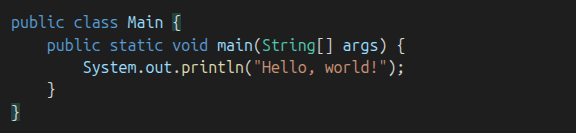
Save this code in a file called Main.java.
How to Compile and Run Java Code
Using the terminal:
- x>Navigate to the folder with your Main.java file
- x>Compile the code:
javac Main.java- x>Run the compiled program:
java Main- x>You should see:
Hello, world!Understanding the Code
Let’s break down the Hello World example:
- x>public class Main — defines a class called Main
- x>public static void main(String[] args) — this is the entry point of every Java program. The JVM looks for this method when it starts your code.
- <ppublic – allows the JVM to access it from outside the class
- <pstatic – means it can be called without creating an object
- <pvoid – it doesn’t return any value
- <pString[] args – this is where you can receive input from the command line
- x>System.out.println(...) — prints a message to the console
Everything in Java must be inside a class, and the program starts from the main method. This is the method that runs first — the one the JVM uses to launch your code.
How Java Runs Code
- x>Your .java file is compiled into bytecode (Main.class)
- x>The Java Virtual Machine (JVM) runs the bytecode on your system
Think of the JVM as a translator that turns your Java instructions into commands your specific operating system understands. It’s what makes Java so flexible — your code only needs to be written once, and it can run on any device that has a JVM. When you run a Java program:
- x>The JVM starts and loads your program into RAM
- x>It creates a main thread to execute your code
- x>It looks for the main method and starts running the instructions inside
- x>When the main method finishes, the program ends
This behind-the-scenes process helps explain what’s actually happening when you hit "Run" in IntelliJ or use the terminal.
What’s Next
Now that you’ve written and executed your first Java program, it’s time to explore how to work with variables, user input, and data types. This will allow you to build more interactive and meaningful programs.