Exceptions and Error Handling in Java
Code never goes perfectly, and that’s expected. Sometimes files don’t exist, networks fail, or users type things they shouldn’t. That’s where exception handling comes in.
What is an Exception?
An exception is an object that represents an error or unexpected situation during program execution. When something goes wrong, Java throws an exception. There are two main types:
- x>Checked exceptions – Must be handled or declared. (e.g., IOException)
- x>Unchecked exceptions – Can happen at runtime and don’t have to be declared. (e.g., NullPointerException)
Try, Catch, Finally
Let’s see the structure of basic error handling:
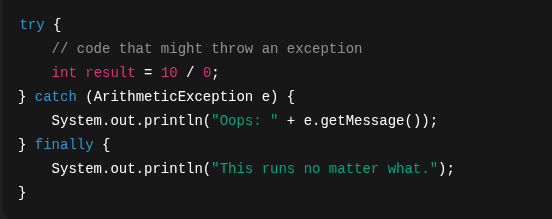
- x>try → the risky code.
- x>catch → what to do if it breaks.
- x>finally → runs whether there was an error or not.
You can have multiple catch blocks for different types of exceptions.
When and Why to Handle Exceptions
Good exception handling helps you:
- x>Prevent app crashes
- x>Provide better user feedback
- x>Log meaningful errors for debugging
Pro tip: Catch only what you can handle. Don’t swallow every error silently.
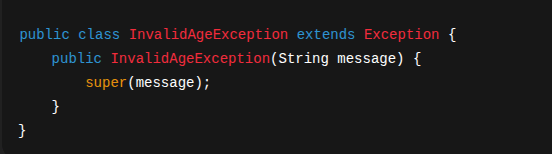
Custom Exceptions
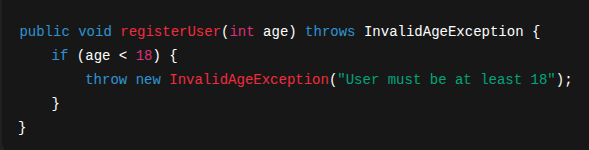
You can create your own exception to describe specific errors in your domain:
And use it like:
Best Practices
- x>Be specific – Catch specific exceptions, not just Exception
- x>Don’t ignore errors – Always log or handle them
- x>Fail fast – Throw early, catch late
- x>Avoid unnecessary try-catch – Only catch when you can do something meaningful
What’s Next
Now that you know how to deal with failures in your code, it’s time to face a new challenge: working with files and external data. In the next chapter, you’ll learn how to read and write files, handle user input/output, and communicate with the outside world — all while applying the exception handling skills you just learned.