Smarter Code: Methods and Reusability
By now, you've written code that takes input, makes decisions, and repeats actions. But if your code is starting to feel messy or repetitive, you’re not alone. That’s where methods come in — your next superpower.
Why Do We Need Methods?
Imagine having to copy-paste the same few lines of code every time you need to do something. Not only is that boring, but it also makes your program harder to fix or update. Methods let you:
- x>Avoid repeating yourself (DRY principle)
- x>Split your code into logical chunks
- x>Give names to actions in your code (making it easier to read)
- x>Reuse code with different inputs
What Is a Method?
A method is a block of code that performs a specific task. You define it once, and you can use (or "call") it as many times as you like. Java methods have four main parts:
- x>Return type: what kind of result (if any) the method gives back
- x>Method name: a unique, descriptive name
- x>Parameters: values you pass into the method (optional)
- x>Method body: the code that runs when the method is called
Example:

This method takes a String and prints a greeting.
Calling a Method
Once a method is defined, you can call it from main or another method:

Return Types
Not all methods just do something — some return values.

Now you can do:

If a method doesn’t return anything, use void as the return type. Example:

This method does something but doesn’t return a value. You can call it like this:

Parameters vs Arguments
- x>Parameters: variables in the method definition (placeholders)
- x>Arguments: actual values you pass when calling the method
Example:

Organizing Code with Methods
Instead of cramming everything inside main(), break your logic into methods:
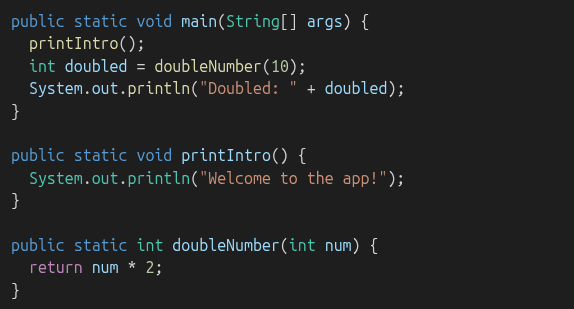
This way:
- x>Your code is easier to test and read
- x>main() becomes a high-level overview of your program
Common Mistakes
- x>Forgetting to return a value in a method that’s supposed to
- x>Mismatching parameter types
- x>Not calling the method at all
- x>Confusing void vs returning something
Practice Time!
Write methods for:
Adding two numberConverting Celsius to FahrenheitChecking if a number is evenPrinting a star patternReturning the larger of two numbersThen, call them from your main() method!
What’s Next
You’re now writing cleaner, smarter code. Next up, you’ll learn how Java uses objects and classes to model real-world things and build even more powerful programs. Get ready for Object-Oriented Programming (OOP)!