Java Collections – Organizing and Handling Groups of Data
Now that you’ve mastered objects and enums, it’s time to scale up. Real programs deal with many values — lists of users, carts full of items, entire libraries of books. That’s where Java Collections come in.
Why Collections?
Imagine this:

What if you had 500 books? Not scalable. Collections let you store, manage, and work with groups of values efficiently.
Arrays – The Foundation
An array holds a fixed-size list of values of the same type:

But arrays can’t grow or shrink. If you need flexibility, you’ll want...
ArrayList – Flexible Lists
ArrayLists let you add and remove elements dynamically:
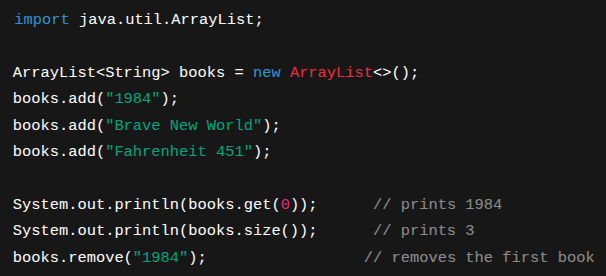
Use an ArrayList when:
- x>You want to maintain order
- x>You need to add/remove a lot
- x>You don’t need to worry about duplicates
HashSet – No Duplicates Allowed
A HashSet is an unordered collection of unique values:
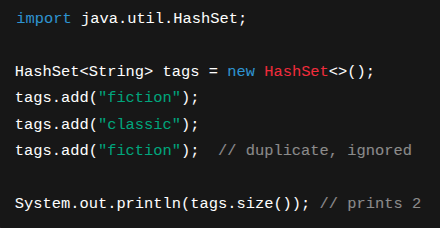
Use a HashSet when:
- x>You care about uniqueness
- x>You don’t care about order
HashMap – Storing Key/Value Pairs
A HashMap stores data in a key → value structure:
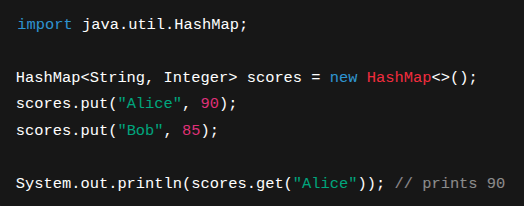
Use a HashMap when:
- x>You want to quickly find a value by a key
- x>You’re modeling relationships (like a name and score)
For-each Loops and Iteration
You’ll often loop through collections:
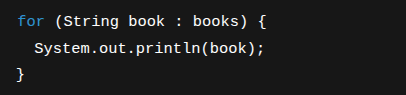
This is called a for-each loop. It’s clean and simple. You can also use for loops or while loops when you need index-based control.
Type Safety and Generics
Why do we write ArrayList<String> instead of just ArrayList? Because Java uses generics to keep your collections safe.
- x>ArrayList<String> means: this list only holds strings.
- x>If you try to add an int, the compiler stops you.
Java automatically converts between primitives and objects in collections:

This is called autoboxing.
Practice!
Build a mini library system:
Use ArrayList<String> to store a list of book titles.Create methods to add, remove, and list books.Bonus: Use HashMap<String, String> to track which user borrowed which book.Recap
- x>Arrays are simple but fixed in size.
- x>ArrayLists grow and shrink easily.
- x>HashSets ensure no duplicates.
- x>HashMaps connect keys and values.
- x>For-each loops are clean ways to iterate.
- x>Generics keep your collections type-safe.
What’s Next
Now that you’re organizing data like a pro, let’s level up and revisit object-oriented programming — this time with more power: Coming up next: “Beyond the Basics of OOP” — abstract classes, interfaces, and the Object class.