Thinking Like a Developer – Solving Problems with Code
You’ve already picked up tools like variables, conditionals, loops, and methods. But there’s something deeper going on now — you’re learning how to think like a developer. This chapter is about mindset. Programming isn’t just about typing the right words in the right order — it’s about solving problems logically, step by step. If you start building that way of thinking now, every concept that comes after this will make way more sense.
What Does It Mean to Think Like a Developer?
To “think like a developer” means being able to take a problem and break it down into pieces you can manage. It’s about being calm in front of complexity and turning chaos into clear steps. You don’t start with perfect code. You start with an idea, or maybe just confusion — and you work toward clarity. Here’s what that mindset looks like in action:
- x>Break the problem into smaller parts.
- x>Ask questions about the inputs and outputs.
- x>Think in steps — what comes first? What needs to happen next?
- x>Don’t panic when something goes wrong. Debugging is part of the process.
A Repeatable Process for Solving Problems
Here’s a framework you can use every time you face a programming task:
1. Understand the Problem
What’s being asked? What are your inputs? What output is expected?
2. Break it down.
List each task your code needs to perform. Write out steps in plain English.
3. Sketch it out.
Use pseudocode or comments before jumping into code.
4. Write the simplest working version.
Forget perfect. Just make it work.
5. Test it.
Try different inputs. Does the logic hold up?
6. Improve and refactor.
Make the code cleaner. Handle edge cases. Add polish.
You don’t have to know everything to solve problems — you just need a system.
Example: Late Fee Calculator
Problem: A library wants to charge $0.25 per day after a book’s due date. They want a small program to calculate the total fee based on the number of overdue days. Let’s break it down:
- x>Input: Number of days overdue.
- x>Logic: Multiply that number by 0.25.
- x>Output: Display the total fee.
Here’s one way to code it:
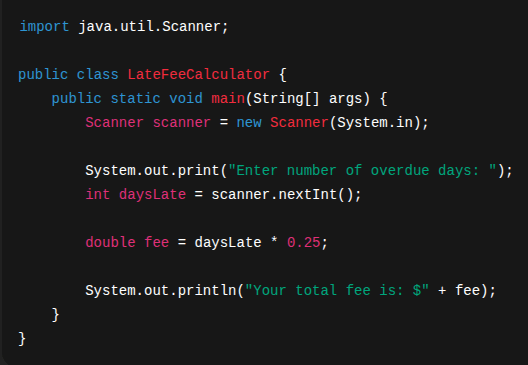
Simple? Yes. But not random — it’s built from a clear plan.
Developer Tools That Help You Think
Professional developers don’t just wing it — they use tools to help organize their thinking:
- x>Pseudocode: Write out your logic in plain language before writing real code.
- x>Flowcharts: Visual diagrams of steps and decisions.
- x>Rubber duck debugging: Explain your code (even to an actual rubber duck) to spot mistakes.
These may sound silly — but they work.
Practice Challenge: Who’s Bigger?
Let’s try a small problem. Challenge: Ask the user for two numbers and print which one is larger. Example output:

Your plan might be:
- x>Ask for two numbers.
- x>Compare them.
- x>Print which is bigger — or if they’re equal.
Here’s a possible solution:
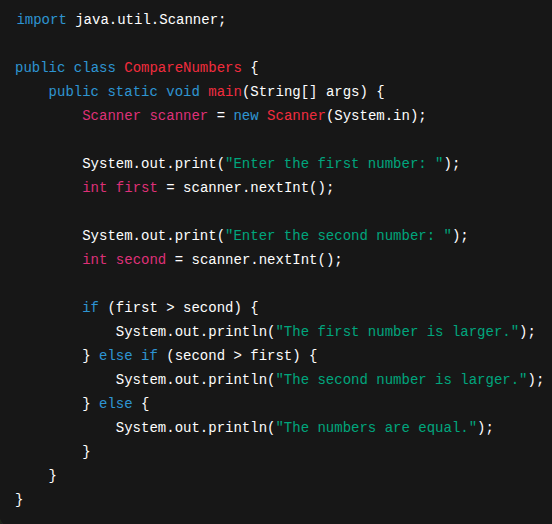
Try writing it on your own first — even if you get stuck, that’s where the learning happens.
Final Thought: Programming Is Problem Solving
You’re not just learning syntax. You’re learning how to think. That mindset — break it down, try something, test it, fix it — is what separates people who use code from people who create with it. That mindset will carry you through every new concept we throw at you from here on out.
What’s Next
Now that you’ve sharpened your problem-solving mindset, it’s time to level up your logic. The next chapter is all about algorithms — the thinking patterns that power efficient, elegant solutions. You’ll learn to sort, search, and optimize your code — and more importantly, understand why one solution might be better than another. This is where computer science meets real-world code. Let’s dive in.