Algorithms: Solving Problems with Smarter Code
You’ve been building your problem-solving muscle. Now it’s time to take it further — by writing not just working code, but better code. This chapter is about algorithms — a fancy word for step-by-step strategies to solve problems efficiently. Think of them as tools in your developer toolbox. The more you have (and understand), the more capable you become.
Why Do Algorithms Matter?
Imagine two programs that solve the same problem:
- x>One runs in seconds.
- x>The other takes forever as the data grows.
The difference? The algorithm. A good algorithm means:
- x>Smarter code (faster, more scalable)
- x>Easier debugging and improvements
- x>Real-world readiness (this is what dev interviews test for!)
Algorithmic Thinking, Step by Step
You already do this every day without realizing: Real-world example: "Find a word in a dictionary."
- x>Strategy 1: Start at page 1 and flip until you find it. (Inefficient)
- x>Strategy 2: Use alphabetical order, flip to halfway, adjust — done fast! (Efficient)
That’s an algorithm in action. When coding:
- x>Define the problem clearly
- x>List possible ways to solve it
- x>Pick the most efficient one
- x>Implement it in small, testable steps
A Simple Case: Finding the Largest Number
Naive Approach
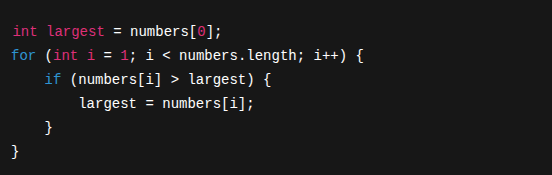
It works — and for small inputs, it’s totally fine.
Comparing Efficiency
But what if you had 1 million numbers? This is where developers start thinking in Big-O — a way to talk about how much work a program does as input grows. Without going full-theory, here’s the gist:
- x>O(n) → Slower as input grows (like our loop)
- x>O(log n) → Fast, like binary search
- x>O(n²) → Gets slow really fast (you’ll see this in bad sorting)
Don’t worry about memorizing — just know: smarter logic means better performance.
Sorting: The Ultimate Developer Workout
Sorting a list is one of the most common problems in computer science. Here’s a basic one:
Bubble Sort
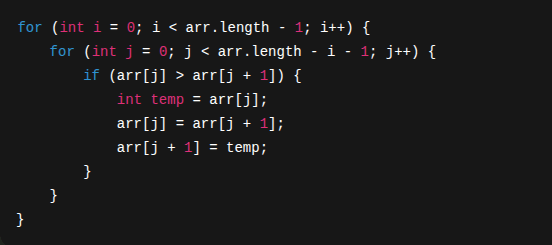
Easy to understand. But not efficient for big lists. That’s why most real-world code uses built-in sorts — they use faster algorithms under the hood (like QuickSort or MergeSort).
Practice Challenge: Word Search
Write a method that checks if a word exists in a list of words.
- x>Input: A string to search for
- x>Output: true or false if it’s in the list
Try writing:
A simple loop-based searchThen try using Collections.binarySearch() — what’s the difference?Conclusion: The Art of Smart Problem Solving
Algorithms aren’t just for textbooks or interviews. They’re how developers:
- x>Save users time
- x>Make products scalable
- x>Impress at technical interviews
You don’t need to know all the fancy ones — just learn to ask: “Is there a smarter way to solve this?”
What’s Next
Now that you’ve learned how to think like a problem solver and craft smarter code through algorithms, it’s time to talk about the containers for that data. In the next chapter, we’ll explore Java Collections — powerful tools like Lists, Sets, and Maps that help you store, organize, and access information efficiently. Think of them as your code’s toolbox — and knowing when to use which one is what separates junior coders from confident developers. Let’s gear up.