Repetition Without Boredom – Mastering Loops in Java
Your code can now make decisions. Awesome! But what if you want your program to do something more than once? Maybe a lot more than once? You could just copy and paste the code a few times. Or… you could use loops.
What You’ll Learn
- x>What loops are and why we need them
- x>The structure of a loop
- x>How while, for, and do-while loops work
- x>Loop control with break and continue
- x>How to avoid common loop mistakes
Why Loops?
Imagine trying to print numbers from 1 to 100 with just System.out.println() — your fingers would fall off. Loops let you:
- x>Repeat actions automatically
- x>Run blocks of code multiple times
- x>Simplify repetitive tasks
- x>Process collections or user input repeatedl
What Is a Loop?
A loop is a control structure that repeats a block of code as long as a condition is true. All loops share three essential components:
- x>Initialization – set up the loop variable
- x>Condition – decide whether to keep looping
- x>Update – move closer to making the condition false
These parts help the loop start, keep going, and stop when it should.
The while Loop
Use a while loop when you don’t know how many times the code should repeat.
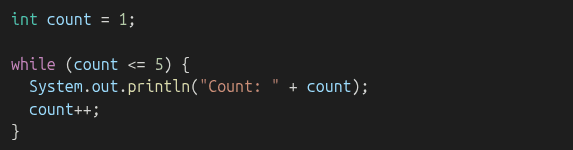
- x>Checks the condition before running
- x>If the condition is false from the start, the loop never runs
The for Loop
Use a for loop when you know how many times to repeat

- x>Initialization: int i = 1
- x>Condition: i <= 5
- x>Update: i++
This is functionally the same as a while loop but more compact and easier to manage when counting.
The do-while Loop
Use a do-while loop when the code should run at least once no matter what.
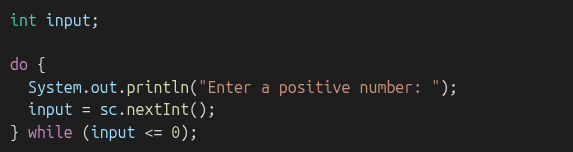
- x>Runs the block before checking the condition
- x>Guarantees at least one execution
Which Loop Should I Use?
Use a for loop
- x>When you know exactly how many times to repeat something.
- x>Example: “Count from 1 to 10” or “Run this block 5 times.
- x>It’s like setting a timer: “Do this 10 times, then stop.
Use a while loop
- x>When you have no idea how long it’ll take.
- x>Example: “Keep asking until they type the right answer.
- x>It’s like waiting for someone to finally say ‘yes’ — could be quick, or never
Use a do-while loop
- x>When you must do it at least once, no matter what.
- x>Example: “Ask them for input first, then check if it’s valid.
- x>It’s like trying new food once before deciding if you want more.
Each loop has a personality. Pick the one that fits your vibe for the task.
break and continue
Use these to control the flow of loops:
- x>break – stops the loop entirely
- x>continue – skips to the next iteration
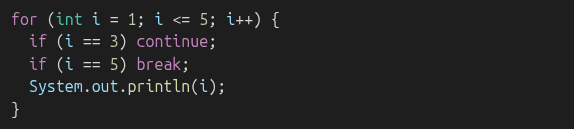
Output:

Common Mistakes
- x>Infinite loops (forgetting to change loop variable)
- x>Wrong conditions (<= vs <)
- x>Confusing = (assignment) with == (comparison)
- x>Missing braces in multi-line blocks
Practice Time!
Try writing code that:
Counts from 10 to 1Repeats until the user types “exit”Sums numbers from 1 to 100Creates a simple multiplication tableWhat’s Next
Now that you can repeat code, it's time to organize and reuse it better. In the next chapter, you'll learn about methods — reusable blocks of code that make your programs cleaner, smarter, and easier to maintain.