Building with Blueprints – Introduction to Object-Oriented Programming
You now know how to write methods, reuse logic, and keep your code clean. But there’s still one huge piece missing — how to design programs that model real-world problems. That’s where Object-Oriented Programming (OOP) comes in.
Why OOP?
Programs often represent real-world entities: a person, a book, a bank account, a shopping cart. Instead of juggling variables for each attribute, OOP lets you bundle data and behavior together into reusable blueprints called classes. It helps you:
- x>Structure complex programs clearly
- x>Reuse code through inheritance
- x>Reduce repetition and bugs
- x>Model real-world concepts naturally
Think of OOP like building with Lego sets. Each Lego block (object) can snap together with others. Some are standard, some are custom, but together they build something way bigger and more flexible.
Classes and Objects
Let’s start from the basics. A class is a definition of something — it describes what data it holds and what it can do. Think of it like a blueprint for a house. The blueprint isn’t the house itself — it just describes how to build one. An object is a real-world instance built from that blueprint. It actually exists in memory and can perform actions or hold data. Imagine we have a blueprint for a dog:
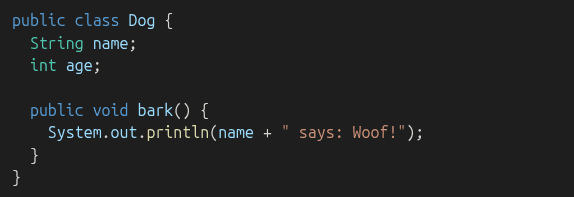
This Dog class says that all dogs have a name and an age, and they know how to bark(). Now, let’s make a real dog from that blueprint:

This creates an object named myDog from the Dog class. It has its own values for name and age, and when we tell it to bark, it uses its current name. You can create as many dog objects as you want, and each one will have its own name and age:

Even though myDog and yourDog are both based on the Dog class, they are totally independent — like two dogs in different houses built from the same blueprint. This idea — of using one class to make many different objects — is at the core of OOP.
Fields and Methods
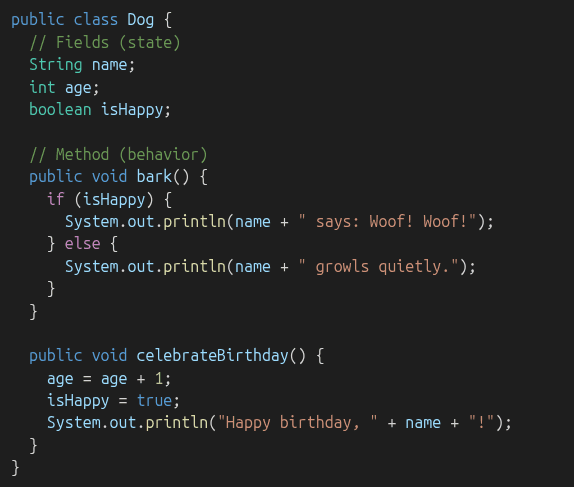
Let’s take a closer look at what makes up a class:
- x>Fields (also known as instance variables) represent the state of an object — its data.
- x>Methods represent the behavior — what the object can do.
Think of a class as a character in a video game:
- x>Fields: health, level, name, score → describe the character
- x>Methods: jump, attack, heal → actions the character can perform
Let’s revisit our Dog class with more detail and clearer formatting:
Now let’s see how we create and use a Dog object:
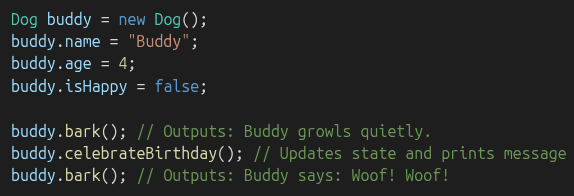
This is the heart of OOP: bundling data and behavior together.
Constructors
A constructor sets up your object with initial values when it's created. It's a special method with the same name as the class.
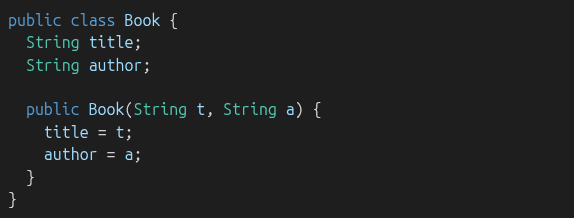
Now you can create a book like this:

Constructors make your objects easier to initialize and work with.
Encapsulation
Encapsulation means keeping internal data safe and only letting the outside world interact with it in controlled ways. You do this by:
- x>Making fields private
- x>Creating get and set methods to control access
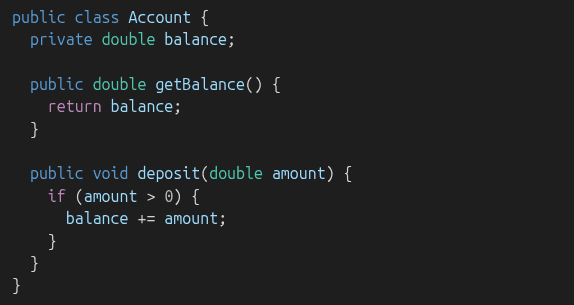
Why bother?
- x>Protects against invalid data (like negative deposits)
- x>Keeps your program more stable and secure
- x>Makes your object behave like a black box: useful, but safe
Inheritance
Inheritance lets one class reuse the code of another. It’s like saying: "This new thing is a kind of that older thing."
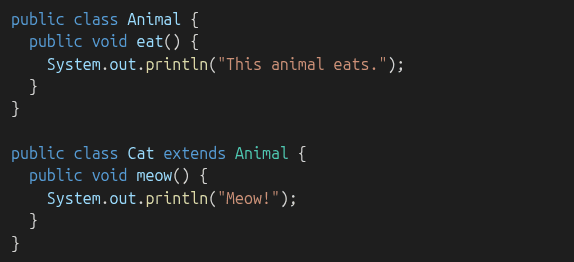
Cat inherits eat() from Animal, but adds new behavior (meow()). Use inheritance when multiple classes share behavior, but each needs a few custom touches.
Polymorphism
Polymorphism lets you treat different objects as if they were the same type. It’s like saying: "I can use this method on any object that can do it, no matter what kind of object it is."

To make this powerful, you can override methods:
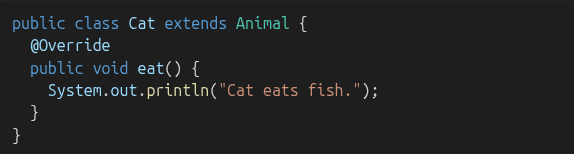
Even though you're using an Animal reference, it runs the correct version of eat() depending on the actual object. Why does this matter?
- x>It lets you write flexible, scalable code
- x>You can build systems that use abstract rules, but behave differently at runtime
Practice Time!
Try writing a small OOP program:
Create a Car class with fields (make, model, year)Add a constructorAdd a method start()Create a ElectricCar class that extends Car and overrides start()Bonus: Create an array of Car references and store both Car and ElectricCar objects. Loop through and call start()!
Recap
- x>Class = blueprint, Object = real instance
- x>Fields store data, Methods do actions
- x>Constructors help initialize objects easily
- x>Encapsulation keeps internal data safe
- x>Inheritance shares code across related classes
- x>Polymorphism lets one interface support many behaviors
What’s Next
Now that you can model the world with classes and objects, it’s time to manage groups of data. Up next: Java Collections — arrays, lists, maps, and sets! These tools will let you build programs that handle a lot more than one object at a time.