Storing and Using Information in Java
Now that you’ve seen how to write and run a Java program, let’s make it do something useful. In this chapter, you’ll learn how to store data, accept input from the user, and start working with different types of values. This is where your programs stop being one-sided and start becoming interactive.
What You’ll Learn
- x>What variables are and how to use them
- x>Java’s most common data types
- x>How to get input from a user
- x>How to display and combine output
- x>How to write comments and keep your code readable
- x>Basic operators and expressions
What Are Variables?
Think of variables like labeled boxes in memory that hold values.

You can use these values throughout your program — update them, print them, or combine them.
Java’s Data Types
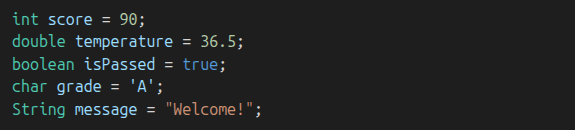
Primitives (store actual values):
- x>int — whole numbers
- x>double — decimals
- x>boolean — true or false
- x>char — a single character (like 'A')
Reference Types (store references to objects):
- x>String — a sequence of characters (like 'Hello')
Comments in Java
Comments help explain what your code is doing. Java ignores them when running the program.
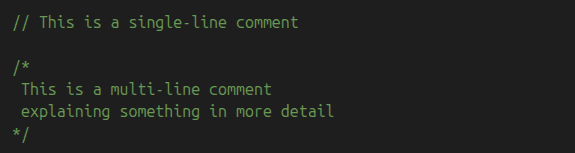
Use comments to make your code readable for future-you (or anyone else).
Getting Input from the User
We’ll use the Scanner class to let the user type information into the program.
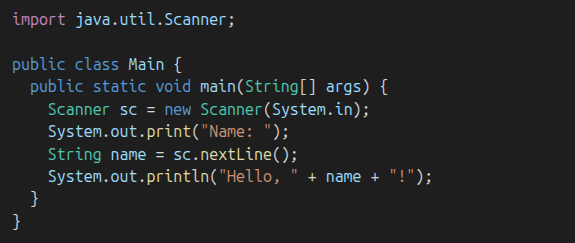
You only need to import Scanner once at the top of your file.
Operators
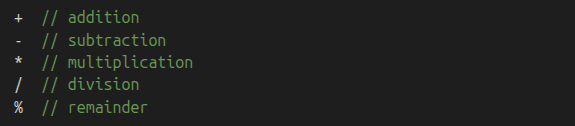
Arithmetic Operators
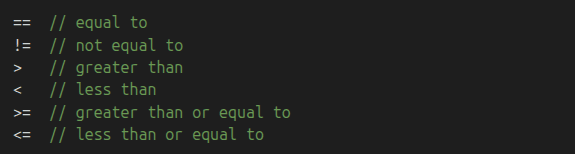
Comparison Operators
Practice Time!
Try this mini challenge:
Ask the user for two numbers.Print the sum, the difference, the product, and the quotient.Then:
Ask the user for their name and favorite programming language.Print a greeting that includes both.What’s Next
Now that your programs can store and use information, let’s learn how to make decisions. In the next chapter, we’ll explore conditions: if, else, and how to control your program’s flow based on logic.