Working with Files and I/O in Java
Programs don’t just live in their own little bubble — they need to talk to the outside world. Sometimes that means reading a file, writing one, or asking the user for input. Welcome to Input/Output (I/O) in Java.
Why I/O Matters
- x>Load configuration from files
- x>Save user data
- x>Read logs, CSVs, and data sets
- x>Automate tasks like generating reports
I/O is everywhere. And Java gives you a lot of tools to work with it.
Getting Input from the User
We’ve done this before — but here’s a simple example using Scanner again:
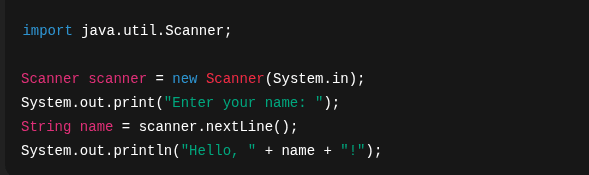
Scanner can read text, numbers, tokens — from the keyboard or even files.
Reading Files
Let’s say you have a text file called data.txt.
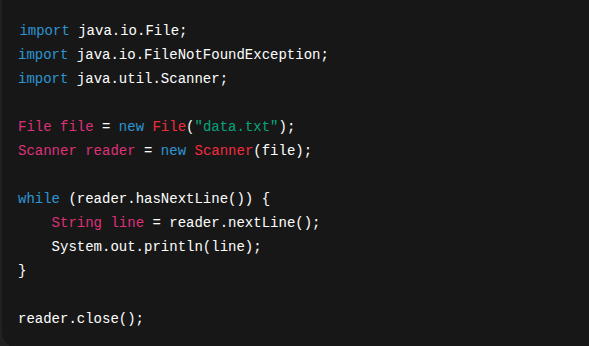
Don't forget to close() the Scanner when done!
Writing to Files
Want to save some text into a file? Try this:
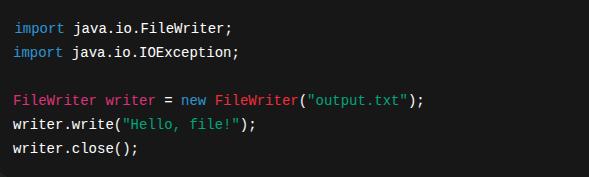
This will create (or overwrite) output.txt with your content. Use FileWriter(true) to append instead of overwrite.
I/O and Exceptions
File operations can fail. That’s why we surround them with try/catch blocks.
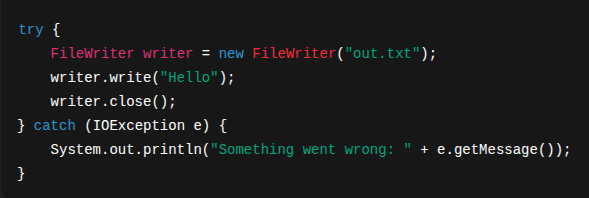
You’ll encounter:
- x>FileNotFoundException
- x>IOException
- x>Permissions issues
I/O almost always means checked exceptions. You must handle or declare them.
Alternatives and Utilities
Java has many other I/O tools:
- x>BufferedReader and BufferedWriter — for large text files
- x>Files (from java.nio.file.*) — super handy for modern file operations
- x>PrintWriter — easy file writing with formatting
You’ll encounter these more in future projects, but now you know the basics.
Mini Challenge
Write a program that:
1. Asks the user for a name2. Saves it to a file3. Then reopens that file and prints out the saved nameTry it out!
What’s Next
You’ve learned how your code interacts with the outside world. But now it’s time to look inward — at how to structure your code for reuse and flexibility. In the next chapter, we’ll dive into object-oriented design concepts that make your programs more powerful and maintainable.